
Billing and plans
Life Maintenance has three plans: a free tier that never expires, a Pro tier for individuals, and a Family tier for households. You can upgrade or downgrade at any time from Settings.
What each plan includes
| Feature | Free | Pro | Family | | --- | --- | --- | --- | | Items | Up to 10 | Unlimited | Unlimited | | Maintenance schedules & reminders | Yes | Yes | Yes | | Email & in-app reminders | Yes | Yes | Yes | | Push notifications | | Yes | Yes | | Calendar sync | Yes | Yes | Yes | | iOS & Android apps | Yes | Yes | Yes | | History, warranty & recall alerts | Yes | Yes | Yes | | Reports & analytics | | Yes | Yes | | Dashboard + Kiosk mode | | Yes | Yes | | AI chat assistant | 5/day | 100/day | 100/day per member | | AI lookups (photo, scan, model, URL) | 5 to try | Unlimited | Unlimited | | Priority support | | Yes | Yes | | Member logins with roles | | | Up to 6 | | Personal / Household views | | | Yes | | Approval workflows | | | Yes | | Goals & rewards | | | Yes | | Per-member notification preferences | | | Yes |
Pro is $7.99/month or $79.99/year. Family is $12.99/month or $129.99/year. Annual billing saves about 17%, roughly two months free. Pro and Family both start with a 14-day free trial.
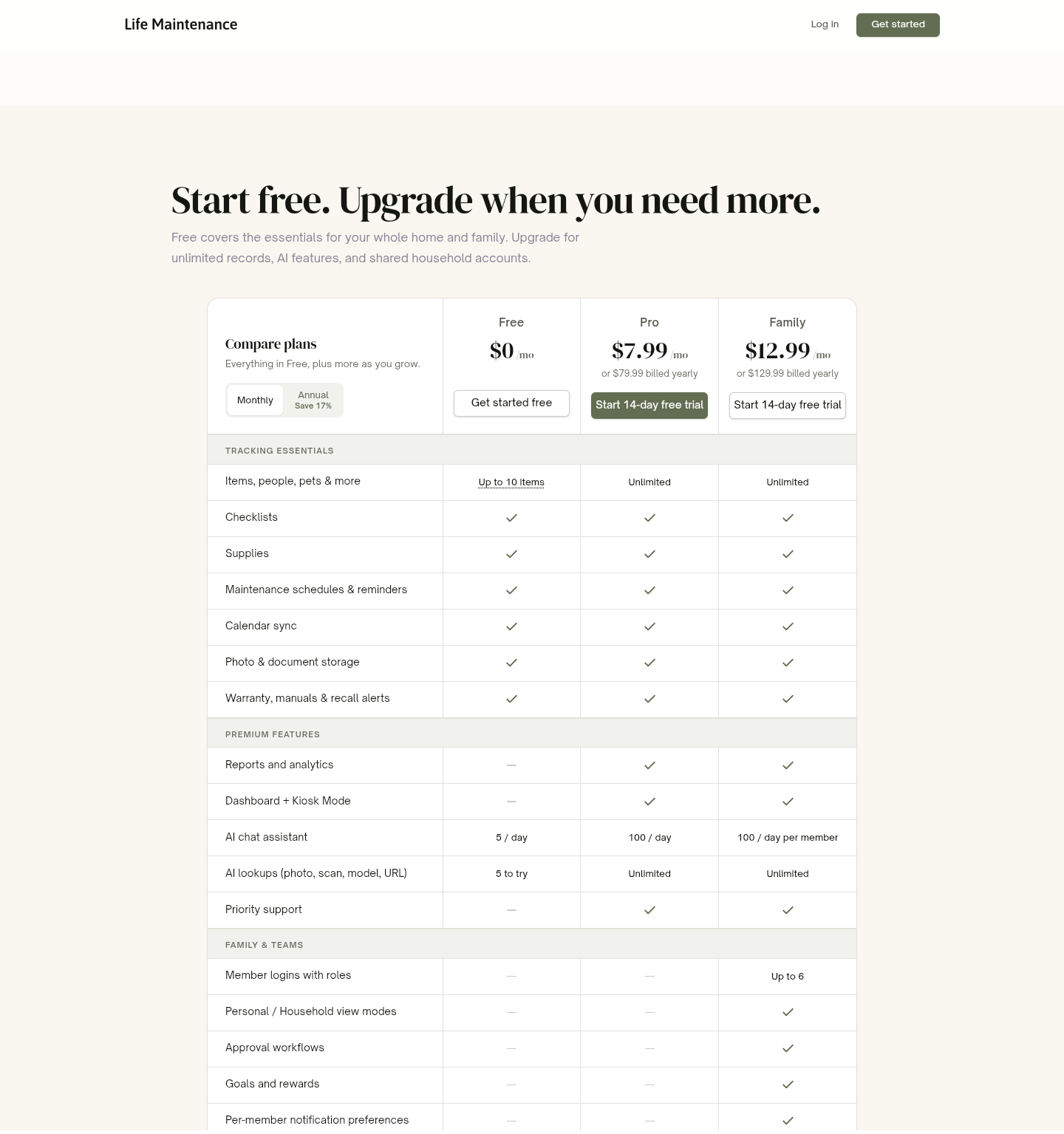
The Free tier is permanent. When you reach a cap, we let you know and show the upgrade option.
Where billing lives
Billing is handled in-app, under Settings → Plan & billing. From there you can see your current plan, switch plans, view invoices, and manage your payment method.
Upgrading
From Settings, open Plan & billing and pick the plan you want. Choose monthly or annual. We use Stripe for payments and accept all major credit cards, plus Apple Pay and Google Pay in supported browsers.
Switching between plans
You can switch between Pro and Family at any time:
- Pro to Family. You are charged the difference, prorated for the current period.
- Family to Pro. Family-only features (Goals, approval workflows, Household view) turn off at the end of the current period, and other members lose shared access at the same time.
We never charge a fee for switching or downgrading.
Canceling
You can cancel in-app. Open Settings → Plan & billing and cancel there. Cancellation takes effect at the end of the current billing period, not immediately, so you keep every paid feature until then.
If you are over the Free record limits when you cancel, we walk you through a step to choose which records to keep active. Your full history is never deleted, even if some records move to a paused state.
Reactivating before the period ends
Changed your mind? While you are still inside the paid period, you can Reactivate from the same billing settings and keep your paid features with no gap in service.
After the period ends
Once the period closes and your account drops to Free:
- Records beyond the Free limits are kept but read-only. Upgrade again and they unlock instantly.
- Your data, photos, and history are preserved.
- Family members keep their own accounts but lose access to your shared household.
We do not refund partial months.
App Store and Google Play subscriptions
If you subscribed inside the iOS or Android app, your subscription is billed by the store, not by us, and you manage it there rather than in Settings:
- iOS App Store. Go to iOS Settings → Apple ID → Subscriptions.
- Google Play. Go to Play Store → profile icon → Payments & subscriptions → Subscriptions.
Canceling or requesting a refund goes through the store's policy. We cannot see your card or directly change a store-billed subscription. Your Billing settings show the right "Manage subscription" link based on where you subscribed.
Changing your payment method
For web (Stripe) subscriptions, open the billing portal from Settings → Plan & billing to update your card. Stripe's secure form handles the card details, so we never see or store your card number.
Invoices and receipts
Every charge generates a receipt. You can view and download past invoices from Settings → Plan & billing.
Refunds
If something went wrong (you were charged after canceling, or forgot to cancel before a renewal), contact support. We are reasonable about it and will work it out. Store-billed subscriptions are refunded through the store.
What to read next
- The Family plan for how shared households work.
- Account and security for profile and password help.
- Contact support if something looks wrong on a charge.